
The Shopify CRO App That Ranks Every Fix by Revenue
Xanavo scans your store, gives it one Health Score, and shows exactly what is costing you sales, in the order that pays back first. Our own innovation, the same scanner our specialists use on every CRO project.
Free plan, no expiry. Paid plans from $59 a month. No customer data requested.
From Install to Results in Four Steps
Install and Scan
Install, and the First Scan Runs on Its Own
Install Xanavo from the Shopify App Store. One permission screen, no customer data requested, no code to paste. The first scan starts within minutes.
- One permission screen
- No customer data requested
- No theme edits, no developer needed
See Your Health Score
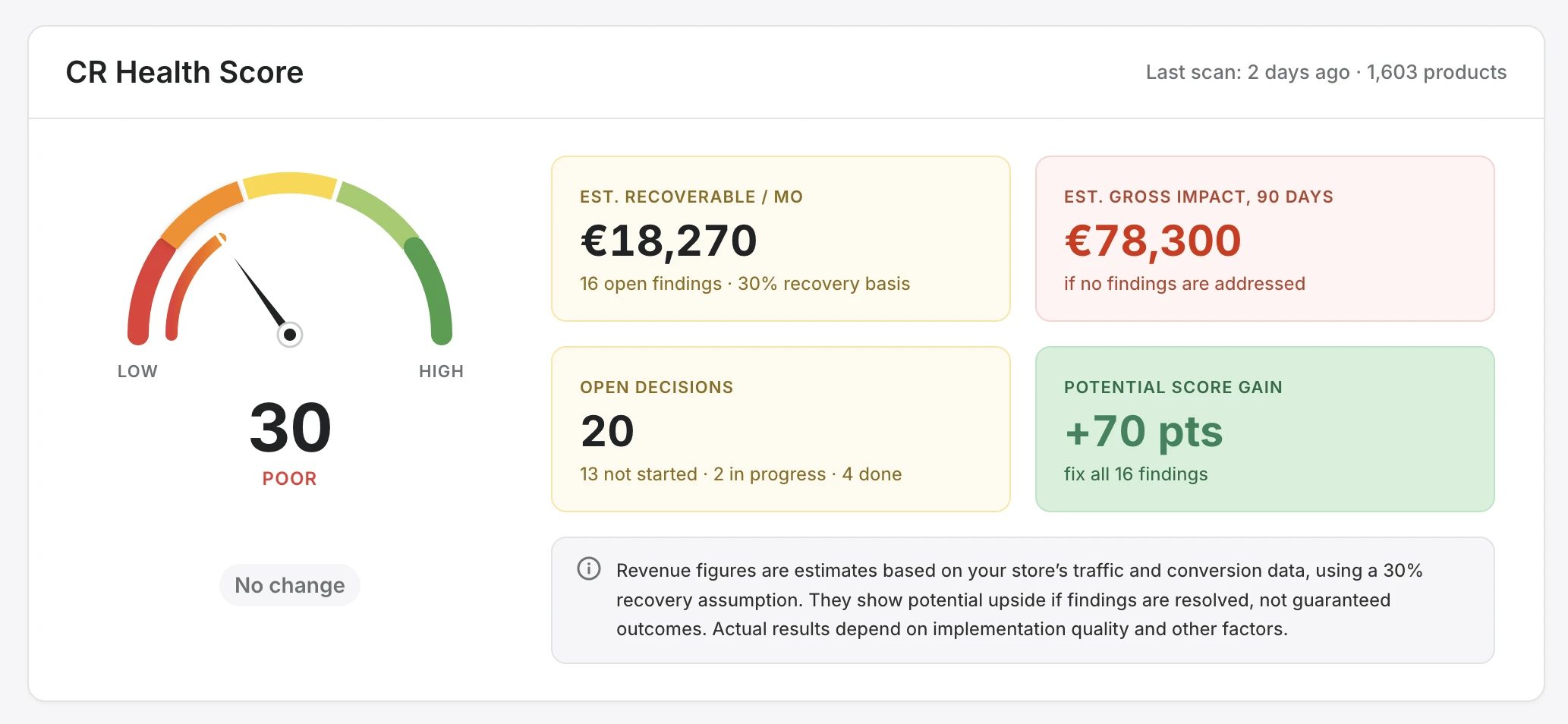
One Health Score, From 30 to 100
Your store gets a single Health Score, with the revenue you can recover each month and what it costs to do nothing. Catalogue findings arrive shortly after install. Funnel findings build as storefront activity comes in over a rolling 30 day window.
- One score you can watch move
- Recoverable revenue per month
- Funnel findings grow with your traffic
Fix What Matters First
A Ranked List, and a Roadmap for Every Fix
Findings become decisions, ranked by the revenue each one recovers. Open any decision for a step by step roadmap written for merchants, not developers.
- Highest value fix first
- Step by step roadmaps
- Track each step as you go
Track and Protect
Every Scan Proves the Work, and Guards It
Each scan verifies what you fixed and moves the score. If a theme update or a new app undoes a fix, Xanavo flags the regression before it costs you.
- Before and after on every fix
- Regression alerts
- Full scan history
Everything Inside the Xanavo App
1 of 12
Know Exactly Where Your Store Stands
One Health Score from 30 to 100, with four tiles that turn it into money: recoverable revenue per month, the 90 day cost of doing nothing, open decisions, and the score you can still gain.
- Know Exactly Where Your Store Stands: One Health Score from 30 to 100, with four tiles that turn it into money: recoverable revenue per month, the 90 day cost of doing nothing, open decisions, and the score you can still gain.
- See How You Compare to Your Peers: Your conversion rate, add to cart rate, and checkout completion rate set against the average for your industry, so you see exactly where you fall behind.
- Every Finding Ranked by the Revenue It Costs You: Findings are grouped into Product Intent, Checkout Friction, Price and Value, Navigation, and Growth. Each one shows its priority, the points it adds to your Health Score, the revenue you can recover each month, and and a step by step guide to fix it.
- Know Exactly What to Do, Step by Step: Every finding opens into a plain language How to Fix guide. Tick off each step, mark it done, and the next scan confirms it worked.
- See Which Products Are Quietly Costing You: Go product by product: views, view to cart and cart to checkout against your store median, a Health Score for every product, and the findings holding each one back.
- A Clear Plan for Every Product: Every product gets a check of its search title and description, its content opportunities, and an actionable strategy to lift its sales.
- Proof the Work Paid Off: Every decision moves from open to in progress to won. Each win shows the revenue it recovers per month, so you see exactly what every fix was worth.
- Your Score Journey, Scan by Scan: See the points your Health Score gained, the decisions you implemented, and the revenue recovered, with every scan plotted over time.
- Every Funnel Metric, Tracked over Time: Overall, mobile and desktop conversion, add to cart, checkout start, and checkout completion, each compared with your first scan.
- Never Lose Ground Without Knowing: When a fixed finding reappears after a theme update, a new app, or a settings change, an alert fires. Mobile conversion gaps, out of stock traffic, and checkout drops are flagged too, each with the points you gain by resolving it.
- Every Scan Saved, Every Score Tracked: Run a scan any time or let them run on a schedule. Every scan is saved with its findings and Health Score, so you can see how your store moves over time.
- Set It Once, and Scans Run on Their Own: Choose what you sell, so your store is compared with the right peers, and switch on automatic scans that run on your own schedule.
The Scanner Behind Every Project. Yours to Run Yourself.
Our own innovation, used by our specialists on every project. Install it on your store, or on your clients' stores, and get the same ranked findings.
Built for Shopify. Zero Customer Data.
No Customer Data Requested
Products and anonymous storefront events only. No names, emails, or addresses.
Native Shopify App
Installs from the App Store. No code to paste, no theme edits, no developer.
Your Approval First
Nothing changes in your store without your sign off. You decide what to act on.
Clean Uninstall
Uninstalling removes everything and stops collection immediately.
Rated 5 Stars on the Shopify App Store
Start Free. Upgrade When You Are Ready to Act.
Every paid plan starts with a 7 day free trial.
Free Scan
$0 /month
One scan, no expiry
Starter
$59 /month
2 scans a month, full issue list
Growth
$149 /month
4 scans a month, decisions and roadmaps
Precision
$299 /month
8 scans a month, product level diagnostics
Questions
A conversion rate optimization app finds what stops visitors from buying and tells you what to fix. Xanavo scans your Shopify store, scores its conversion health, and ranks every fix by the revenue it can recover.
No. Xanavo asks Shopify for products and anonymous storefront events only. No names, no emails, no addresses, so there is no customer data consent screen to clear.
Catalogue findings arrive shortly after install, so there is real work to do from the start. Funnel findings build as storefront activity comes in over a rolling 30 day window, faster on busier stores.
Analytics tells you what happened. Xanavo tells you why your store is not converting, what to fix first, and how much each fix is worth, then verifies the result on the next scan.
Nothing changes in your store without your approval. Xanavo shows you what to fix and how. You decide what to act on.
Yes. The Free Scan plan gives you your Health Score and issue categories at no cost and with no expiry. Paid plans start at $59 a month and each one starts with a 7 day free trial.
Yes. Our specialists run full CRO projects using the same scanner: diagnosis, implementation, testing, and measured results. Book a free CRO consultation to see if it fits.
Find Out What Your Store Is Leaking Today
Install in a minute. Your first scan runs on its own.